In my wisdom, having just worked on Git Cherry Tree for nearly a year, I decided to rewrite its entire UI in Rust.
Let’s look at what we ended up with. And explore other questionable decisions along the way.
Why do this?
When I first showed Git Cherry Tree on reddit, I was asked why the backend was in Rust, but with a React UI. My answer was “skill issues”. Early on, I tried every Rust and web UI framework, and I struggled with all of the Rust UIs. Getting styles tweaked, and nice layouts working was a battle. I tried four or five different UI frameworks, concluded that they were not ready yet, and ended up sticking with React and Tauri.
This worked for me all the way through development, and I could have stuck with it. However.
I had run into a few issues along the way, and none of them were important, but they were starting to accumulate, and sooner or later one does start to become urgent, as we shall see.
Here are some of them:
- Performance: Not really, actually! I had heard that web is slow, but my experience was that while you need care, it’s quite manageable, and I could render diffs one million lines long, and fit into 9ms per frame. Not great, not terrible.
- IPC: Tauri forces you to split your application into two processes. This means you need to have a lot of machinery to talk between them, and also on Windows I found this to be very slow!
- Images: Getting images to show up is easy. Because of IPC and more, getting them to show up without flickering and at the right time is not.
- A false virus report! I was displeased indeed to find, that some antivirus thought Git Cherry Tree was a scam! It turns out, that the act of launching a browser, which in turn sets up many processes, a sandbox, and much more, trips up the heuristics of some antivirus software. I was doubly displeased because this was the edge browser, so it wasn’t even my code!
- A huge linux binary! I tried building Git Cherry Tree on linux, and was dismayed to see that not only the binary was an enormous 90mb with Tauri, but looking into the portability story showed that you could not, in fact, just send a binary around with no installer like you do on windows.
I had parked that for later, but the last two told me that later was now!
I used Iced as it seemed the nicest from what I tried, and also there was a new version released recently.
What we ended up with
- 24k lines of ts code -> 45k lines of rust code
- 15mb binary -> 15.3mb binary
- 9ms -> 3-6ms frame time under load
- Every feature in the web UI matched in rust, and some more added.
- Done in a couple of weeks! One week for 90% of the work, and another for the remaining 90%.
- And more weeks to add more stuff on top.
Let’s go over each of these in more detail.
So much code
This surprised me. When I started, each feature felt somewhat reasonable in terms of line count, and I just kept going. I aggressively keep track of line counts (I use Git Cherry Tree to make the commits after all), I had it in my head that the UI code was about 30k lines, which is more than the React version, but not much more.
But looking up the numbers for this post - oh man!
Over 45K lines at parity, and more after that!
Looking through them, the code was not particularly egregious, but needing to vendor in Iced elements did add a few thousand lines. Still, I found that writing in Iced can be pretty verbose, particularly if you want it all nice and polished looking.
So much size
When starting, I was very pleased to see that the binary size went down from 15mb to 8mb. However, as I added more and more features, the binary size kept ballooning!
This was too much, and I then needed to work very hard to squeeze it back down. Among other things, I tried to comb all the dependencies in the cargo tree and dedupe, remove, take out features, pin specific versions, and that got a couple of megabytes off.
I also needed to change some systems to be optimised for binary size, such as syntax highlighting, and icon loading. I cover these below. That was actually the bulk of the reduction.
I also massaged the Cargo.toml files, and compiled my own std library, which shaved a bit more.
The one thing I didn’t do: setting the panics to abort. I left them as unwind for no good reason other than “I might need it later”. This could be a mistake.
| State | Size |
|---|---|
| The web version | 15mb |
| First Iced build | 8mb |
| Every feature added | 23mb |
| After squeezing | 15.3mb |
| If I set panics to abort | 11mb |
As an aside, web UIs rely on a browser to handle much stuff, and only need source code which is a surprisingly dense storage medium when zipped. Compiled code, too, is often smaller than the binary. Here is a game written in C, and packed into an impressive 64kb binary. One of the tricks used there is to write an interpreter, since that’s denser than the same code in binary form!
Performance
This was not really something that bothered me!
I felt like web and react were fast enough, I got good frame times and do everything I needed. Under load, I got about 9-10ms per frame, while scrolling furiously on the largest diffs. This meant that I needed to do live syntax highlighting, get the browser to do all the text, and so on.
I went in with the expectation that performance would be way easier in Iced. It was, but not by much. I also found that I still needed to care about performance in my own code, which was mostly about avoiding expensive clones. So performance was quite cheap, but not free like I thought it might be.
In many ways this was similar to working with the web UI, just with a lower baseline: I got about 3-6ms per frame under load, which is faster than web, but not by an order of magnitude.
No more IPC
Having one process is nice! In Tauri, you have two processes. This doesn’t seem too bad at first, where you want separation between UI and business logic anyway, but it starts to suck when you need to transfer data quickly. The IPC boundary for me on windows was amazingly slow! Here is what I measured, having tried every possible way:
| IPC | Result |
|---|---|
| Latency | At least 3ms to get anything back, and unbounded when the channel is busy |
| Tauri commands | 2-10mb/s (!) |
| Tauri commands, one big payload | ~100mb/s, but the UI freezes while it arrives |
| Internal download protocol | ~40mb/s, by skipping Tauri’s api commands entirely |
So: you can’t rely on anything arriving in time, and so you need to queue, hide the latency, or allow for loading states everywhere.
That said, the setup for this in Tauri is mostly one time, and so of course I kept getting regressions, and ended up going through three different solutions to this. By contrast in Rust you do it once and then it works.
Doing diffs
Diffs are a nice example of how much easier it is to work with no IPC.
I have fought this pipeline before, in rendering million line diffs.
By contrast in Rust, I just clone an Arc and we are done.
I needed syntax highlighting however, and everyone said to use tree-sitter, so I did. This worked great! But also added several megabytes to the binary size! Since I didn’t need to have the entire syntax tree, just coloured words, I just wrote my own simple syntax highlighter that just searches for strings and generates spans with colours.
I could now load my million line diff in around 700ms, from click to shown on screen. This was about 3-4x faster than the web, which had to do all that then download it. I also preprocess the entire diff up front, so that I don’t need to do syntax highlighting on the fly, and support multiline comments.
The quality isn’t quite as good as tree-sitter, but I support over 30 languages covering 70 file extensions, and each new definition is a few lines of code.
Here is Rust:
LangDef {
    exts: &["rs"],
    line_comments: &["//"],
    block_comments: &[("/*", "*/")],
    strings: &["\""], // no ' since it would collide with lifetimes
    keywords: RUST_KEYWORDS,
    types: RUST_TYPES,
    constants: RUST_CONSTANTS,
    capitalize_types: true,
    function_call_heuristic: true,
    numeric_prefixes: true,
},
I can also improve this over time, or speed it up more later.
Images
Images for me were tricky in web and I ran into lots of issues with them, trying to make them load without flickering, which I never really got. By comparison my first try in Iced made them work just right, such that I could load all the user avatars and have them ready on the first frame, getting that instant polished look. I then finally got around to adding image diffs, which I had been putting off. Iced unlocked them for me.
Animations
Iced has no animation system of its own, but writing one yourself is not that hard. The nice thing here is that you control the render time, so you can get your animations crisp and synchronised without any effort.
By contrast, in web half is done by JS on the CPU, and half by the browser on the GPU. This means you get render tearing where half of your animations are a frame off. This is the reason why React virtualized lists have overdraw, which then fails to fix the issue fully. For Iced, you need to write your own virtualized list, but it doesn’t need any overdraw.
Before starting the rewrite I had just finished animating the panes, which need to both resize, and move, and change draw order at once. In web I needed 400 lines of incantations to prevent render tearing. But in Iced this is straightforward.
As a result, I have many more animations in Iced than I did in the web, and they are more advanced than the web versions were.
Custom icons
The web does many things for you, including showing SVGs. In Rust you need to do that yourself. Fortunately, there is an easy solution using an SVG crate, you put it in and it works.
However.
As you may have suspected, this is too much binary size! The SVG crate pulls in more crates and the overall size cost is 3mb or so.
I didn’t need a full SVG renderer, just being able to render some simple icons from Lucide.
There are lots of things you can do here.
Bake them out as rasterized images.
- You make a build script that downloads the icons from a list of URLs
- Use the SVG crate to render and save them into a code generated file
- You only need one colour channel so you save it to an array of bytes and colour at runtime
This worked, but was not resolution independent, so you would need to have a new array for each icon and each resolution, so it wouldn’t scale, and was already taking up around a megabyte of space.
Iced has a canvas renderer and an API to draw shapes, so let’s use that.
- Change the build script to parse the SVGs, since we only need strokes and widths
- Bake that into canvas instructions and code generate a file
This was much smaller, and had the ability to rescale the icons. Great. However, the rasterisation quality was not ideal. The icons were a bit noisy and this caused them to look a bit misaligned.
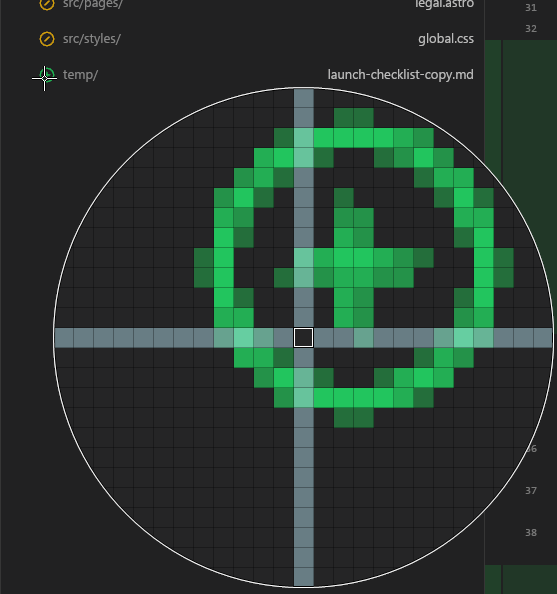
Iced lets you include custom shaders, so let’s try Signed Distance Fields.
- Change the script again to output strokes for a shader
- Write a shader to render them
- Get icons which are the wrong colour
- Suffer
- Figure out that its due to colour spaces. The frame buffer is sRGB, so the shader needs to output premultiplied linear colours, not the result, and let the framebuffer do the encoding.
Now it works! The icons are super crisp and work great, binary size is small, and it’s resolution independent.
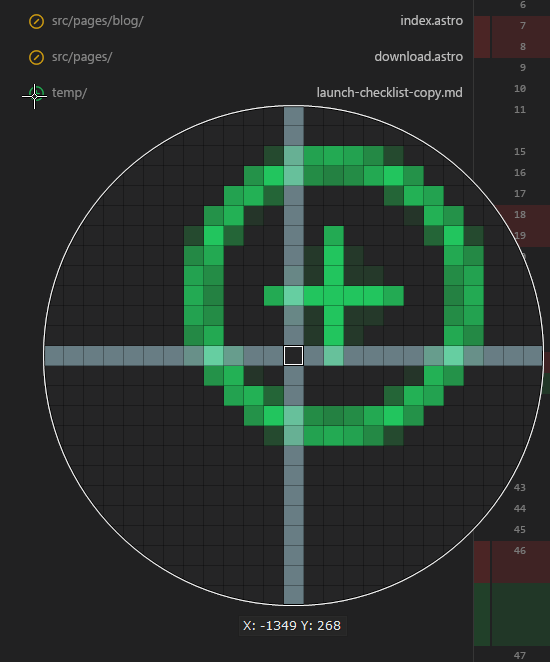
The tool is nice, and may be useful for someone, so I might make a crate out of it and publish it. If you’re interested, let me know!
Windows
The hardest part of the entire thing, was getting windows showing up and resizing correctly.
One would think, that the software known as Windows, would be good at managing windows. One would, of course, be wrong.
This was surprisingly hard!
By default, you get black bars on resize, and issues besides. To fix this, I had to do:
- DirectX only. Everything else calls DirectX to do resizing which breaks sync.
- Set the swap chain frame latency to 0
- Write your own custom render loop that draws the resized frame first, then tells Windows to set the new frame size
- Start the window hidden. But that causes bugs with sleeping so I had to start it cloaked.
- Write a custom startup sequence which starts loading all the windows, then the gpu pipeline, and wait for that then draw the frame, and only then uncloak the window.
- Custom hit tests for resize borders and title bar.
- Handle special cases for minimise and maximise, where you need to not draw new frames.
And more I forgot. If you remove any of that it stops working, so yes all that rubbish is needed.
The general idea is that you must draw the new image on the same frame as the windows resize, and Windows makes it as hard as it can for you.
After all that, I managed to get a sequence like:
- Click the button to start the client
- It shows up in one frame
- No flickering on startup
- No black bars or stretching on resize
More Windows
Also, in case you thought that was it, consider: Moving the window by dragging.
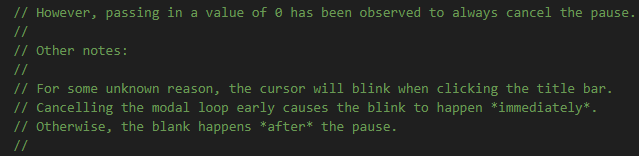
When you click and hold the draggable area, your cursor blinks after half a second. Who knows why this happens.
- I could not figure this out
- The maintainers of Winit could not figure this out
- Notepad++, Filepilot, Blender could not figure this out
- Windows Explorer and all the Microsoft software could not figure this out?
- Browsers figured this out and any web UI works fine??? What is happening?
The windows API has things no man is meant to know.
Cursors and highlighting
Iced is nice. But it wasn’t all sunshine and rainbows. When working with web UI, I found that recurring issues were around render tearing. When working with Iced, the recurring issues were around the mouse cursor and things related to that.
I constantly had issues with it highlighting things through other elements, or having the cursor change from an element below another, and issues like that. The code around handling input was also getting rather verbose, and I ended up writing much code indeed overall.
Was it worth it?
Overall I had a pretty good time with Iced. It addressed the issues I started with:
- Linux went from “portability is ?????” to me sending someone a single file under 20mb which runs anywhere, including an old laptop with no vulkan at all, thanks to a software fallback.
- The zoo of web processes went away, along with the false virus report.
- I made an entire UI with it, and it works!
I did have the advantage of re-writing my UI as opposed to writing it fresh. Writing it fresh is much harder: you need to invent and explore what you need to do, while this was mostly converting code and carefully checking that it looks identical. This also made it much faster to convert, with a lot of stuff getting done in one go.
So. Was it worth it?
I answer: Yes.
In my wisdom, having just done all that, I have some more stuff coming up for this.
But that, is a story for another time.
Enjoyed this? Get notified about Git Cherry Tree updates: